






Zonely MCP Build, manage, and design your website with AI.

Ask your AI to publish an announcement, manage your store, or develop your theme with a single request. Your assistant uses Zonely's tools with the permissions you grant.

  • Cline
  • Codex
  • Claude
  • Cursor
  • GitHub Copilot
  • Gemini CLI
  • Zed

Paste into your assistant

Can you add Zonely MCP here? Download and extract the official ZIP from https://github.com/zonely-gen-tr/zonely-mcp/releases/latest, then follow the installation steps included in the package.

Download ZIP GitHub

You Can you add Zonely MCP here?

Assistant I'm downloading the official package and adding it to this client.

Assistant Zonely MCP is ready. Share your existing site's address, or give me the domain name for a new site.

Give your existing site

the look you want.

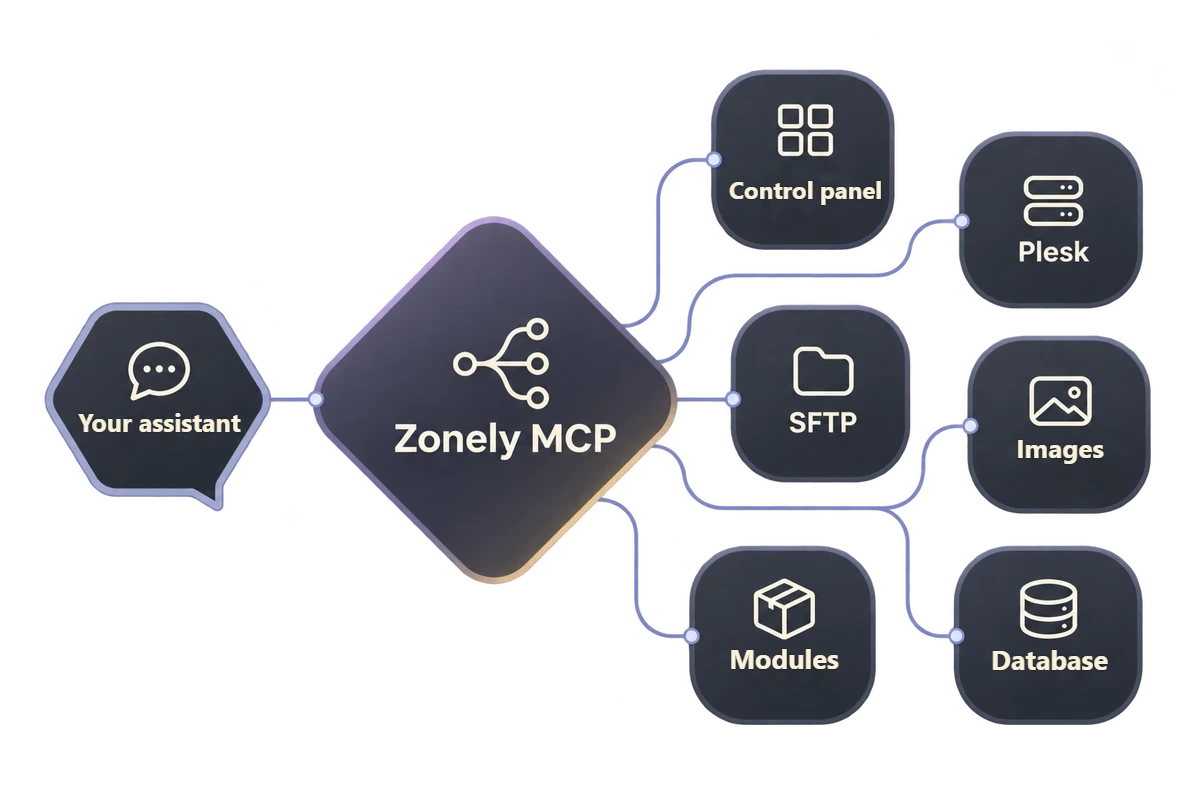
Use your site's control panel from chat. Edit your theme over SFTP, develop PHP modules, and open the official Zonely guides, including phpMyAdmin.

Diagram linking your assistant to the control panel, Plesk, SFTP, images, modules, and database through Zonely MCP.

Start your site with one request.

Domain name, page design, and images.

Describe the site you want and share your domain name. Your assistant previews the trial license and, with your approval, opens the DNS guide. Set the DNS records with your domain provider and finish hosting and initial admin setup in the Zonely panel.

Once your site is live, plan your homepage, game cards, and store in the same request. If your assistant can generate images, use them on your site through Zonely Image Management.

Edit your theme over SFTP with MCP.

Reuse MVC components across pages.

Give your assistant authorized SFTP access to edit theme templates. Work with a custom theme draft or with the active theme files you can access. The assistant checks the file revision before editing and reads the saved result afterward.

Reuse a component from one MVC template on another page by making the required data available. For example, use store product cards in the featured products section of your homepage.

Build a PHP module with MCP.

Connect your database, website, and game server.

Show player activity on a map on your site. The PHP module stores session status and in-game regions in the database. The site template displays the player count in each region.

The server plugin sends joins, disconnects, and region changes to an authorized API. Verify the module ZIP in the panel and test the matching plugin on your game server.

Add custom images to your site library.

Upload an image and reuse its published link.

Share your own file or ask an assistant with image generation to create a cover for your site. It uploads the image through Image Management and retrieves the published link from your library.

Ask your assistant to use the same image on the homepage, in an announcement, or in your theme. If the homepage template needs editing, the assistant adds the link to it using authorized SFTP access.

Frequently asked questions

Your assistant can preview a trial license and open the DNS guide with your approval. Once the site is live, use the panel tools to work on themes, images, and your store.

Yes. Edit templates in a custom draft while your current theme stays live. You decide when to publish.

Package the module's PHP code and Zonely templates in a ZIP. Verify the package in the Modules section, then apply it to your site.

For supported workflows, the assistant checks the existing record, shows a preview when needed, and reads the saved result. For example, you can verify a new theme draft in the Themes list and in the edited template.

Zero Risk without license cost Free Trial
Zonely Your website and store single panel
Your Community Game Discord from together
Zonely For Your Website Powerful Infrastructure
Your Domain Name Your brand Zonely Power

“I give it 10 out of 10. Even other software doesn’t offer this many features.”

— . [maxland.com.tr]

“The support part is very fast and they are interested in everything necessary.”

— Rentr [cyraxnw.com]

“A software company that puts real care into its work and listens to feedback.”

— Forrise [minghost.net.tr]

Your community, all in one place.

Store, games and conversations.

Customize your website, track sales and reach your players. Bring the tools you use to manage your community together in one dashboard.

Get your store ready to launch.

Create products and categories. Set prices, stock and delivery options, then manage sales on your own website.

Explore

From sale to delivery.

Connect products to server commands. Use supported game integrations to deliver ranks, items and packages automatically after an order.

Explore

Make the design your own.

Choose a ready-made theme and adjust colors, fonts, menus and pages to your brand. Preview your changes before publishing.

Explore

Keep support in one place.

Answer members’ questions, follow conversations and share support requests with your team. Keep help articles in one accessible place.

Explore

Stay connected with Discord.

Link website memberships with Discord accounts. Manage your website and community together with role connections and notifications.

Explore

Keep track of your store.

Review orders, payments and user activity. Compare products and sales periods to see how your store is doing.

Explore

Work together as a team.

Set role permissions for support, content and administration. Give each team member the access they need and follow changes through activity records.

Explore

Keep your files within reach.

Edit theme files in the template editor. Access your data, make backups and develop your site with file and database tools.

Explore

Let’s Build Zonely Together

Become part of the community

Ask questions, share your experience and send us your ideas. Stay connected with the Zonely community as you build your project.

Follow the news, release innovations and tips for use.

Join the community; share your questions and experiences.

Tell errors, contribute to your recommendations and improvements.

Zonely

November 22, 2026

Hello ,, what can I help you?